Astro for personal website

I tested an Astro rebuild of this site on a separate branch and subdomain: astro.gregko.com.
The goal was not to rewrite everything at once. I wanted a clean place to try Astro, keep the existing Next.js site live, and let Vercel build the right app based on the branch.
Bootstrap
Astro's CLI was straightforward:
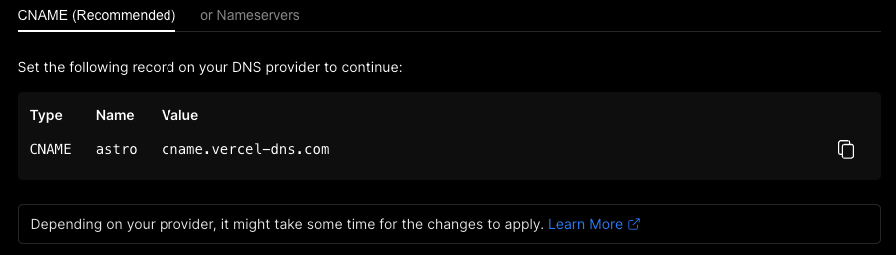
yarn create astroI created the project in its own folder, added the subdomain to the existing Vercel project, and pointed the DNS record at Vercel.
Branch-based build
The annoying part was making one Vercel project handle both the Astro branch and
the existing Next.js app. I changed the Vercel project type to Other and used a
branch-aware build script:
#!/bin/bash

if [[ $VERCEL_GIT_COMMIT_REF == "astro" ]]; then
  npx astro build --root mad-magnitude
  cp -r ./mad-magnitude/dist ./dist
else
  npx next build
  npx next export -o dist
fi
This is not a setup I would recommend for a long-lived production project. It was useful for a contained migration spike: one repo, one Vercel project, two build paths, and a subdomain where I could inspect the Astro version without touching the main site.
What I would do differently now
I would avoid a shared Vercel project for a serious migration. It is convenient for a spike, but the conditional build script hides too much. A separate Vercel project gives the Astro build its own settings, cache, analytics, redirects, and environment variables. It also makes rollback simpler: the Next.js production site does not share a build pipeline with the experiment.
The other thing I would check early is content parity. A personal site is mostly routes, metadata, images, feeds, and redirects. The framework migration is only done when those pieces still work:
- canonical URLs match the current site,
- old blog links redirect cleanly,
- Open Graph images still resolve,
- RSS or sitemap output is still valid,
- analytics does not double-count both deployments,
- the old production branch can be restored without editing DNS.
Astro is a good fit when the site is mostly static content and the interactive surface is small. Next.js is still fine when the app has API routes, richer React behavior, or a deployment setup that already works. For this site, the experiment was useful because it forced that tradeoff into the open instead of treating the rewrite as automatically better.